Quality control software used by global manufacturers.
Monitor quality throughout the manufacturing process with forms your team creates for each stage. Operators enter data on computers, tablets or smartphones, and the system checks the values in real time.
Request a demo See the software in action ↓- Quality monitored at every step, from receiving to shipping.
- Forms your team creates and updates for each process stage.
- Simple data entry on tablets, smartphones or computers.
- Deviations flagged during data entry, with the option to create action plans with assigned owners and due dates.
- Traceable records for audits: who entered, changed and approved each record.
See ProMOS™ Quality
A specialist can explain how the software fits your operation and answer questions about implementation and pricing. Using one of your company’s forms in the demo is optional.
Request a demoTrusted by leading manufacturers
The same platform running at global leaders in food, consumer goods, chemicals and packaging.












System screens
What your team uses every day. Click any screen to enlarge.
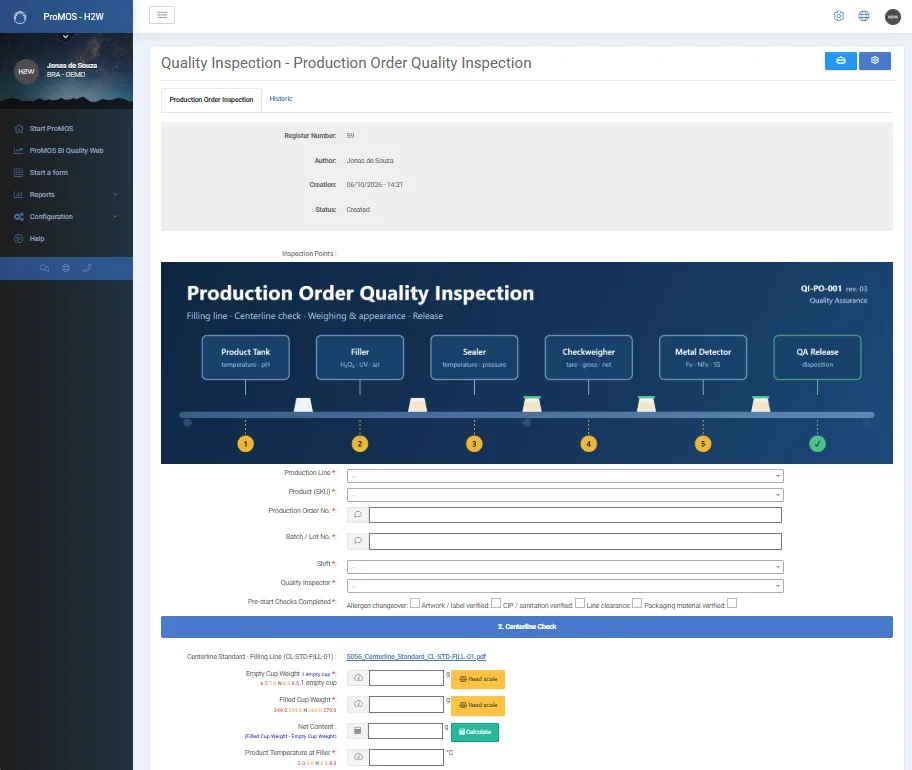
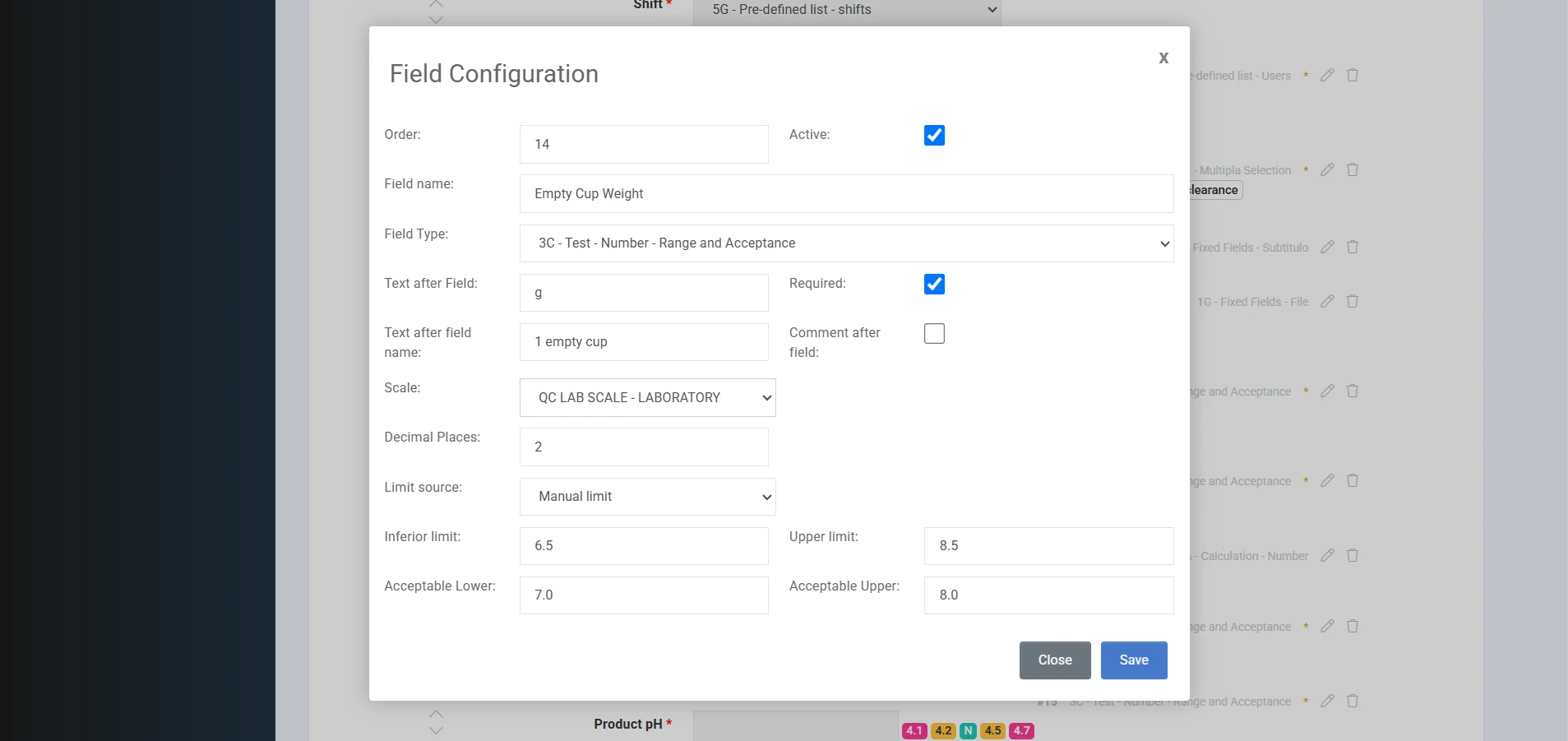
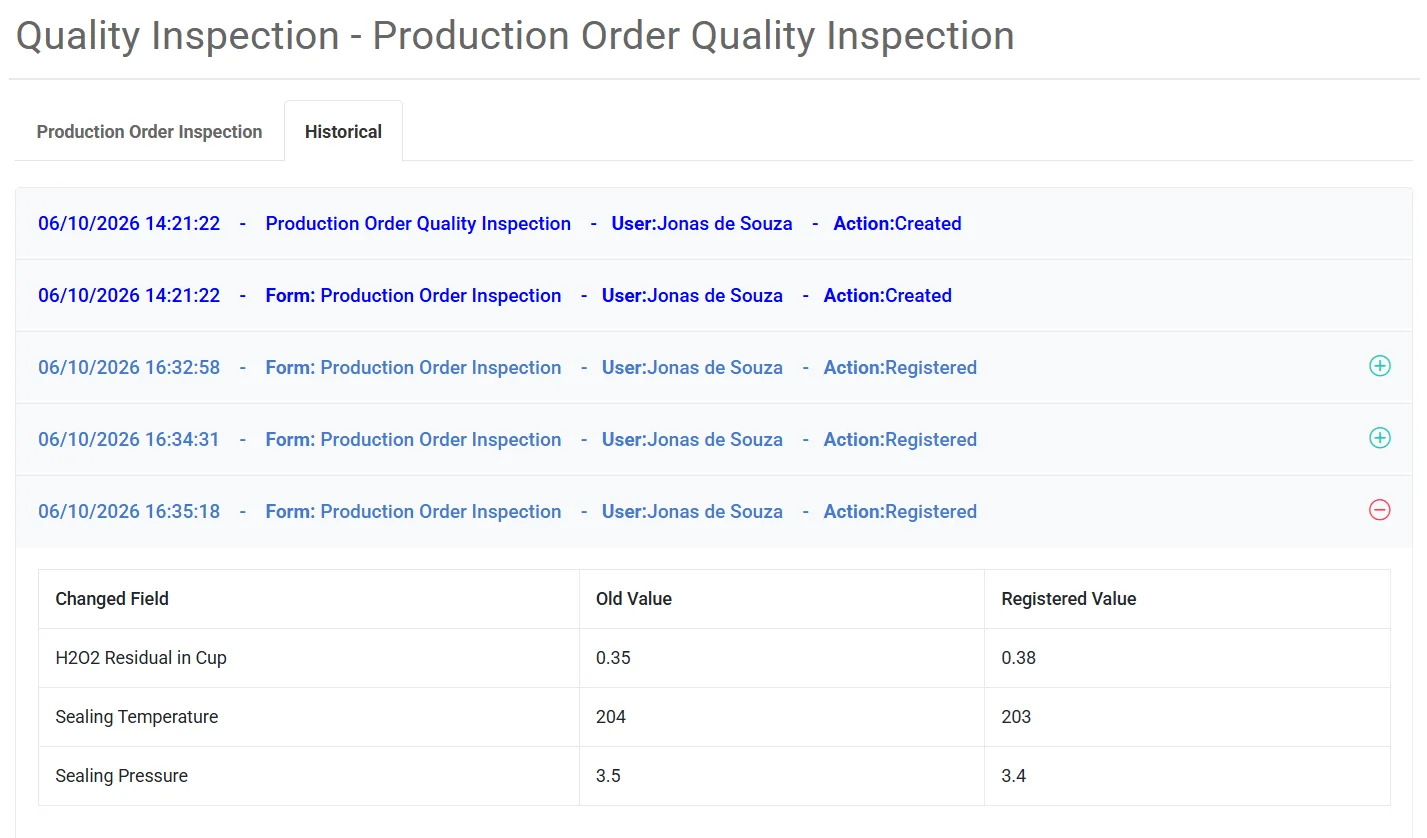
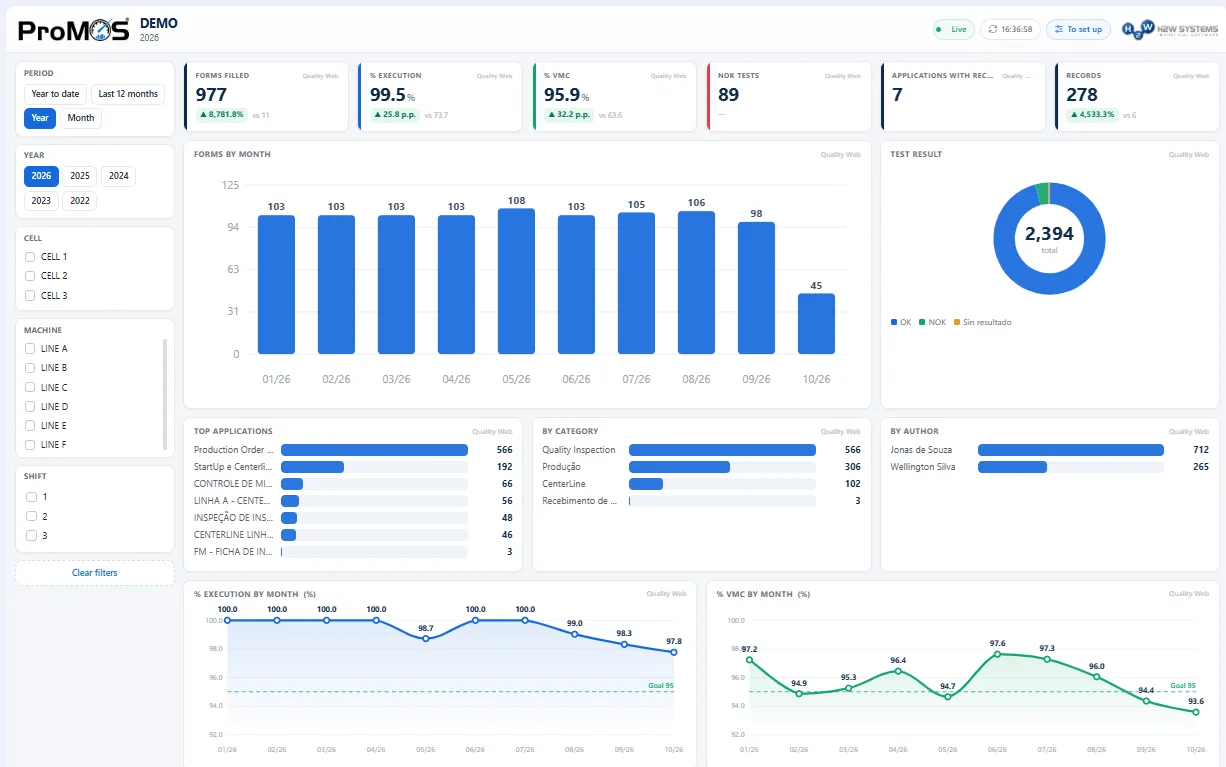
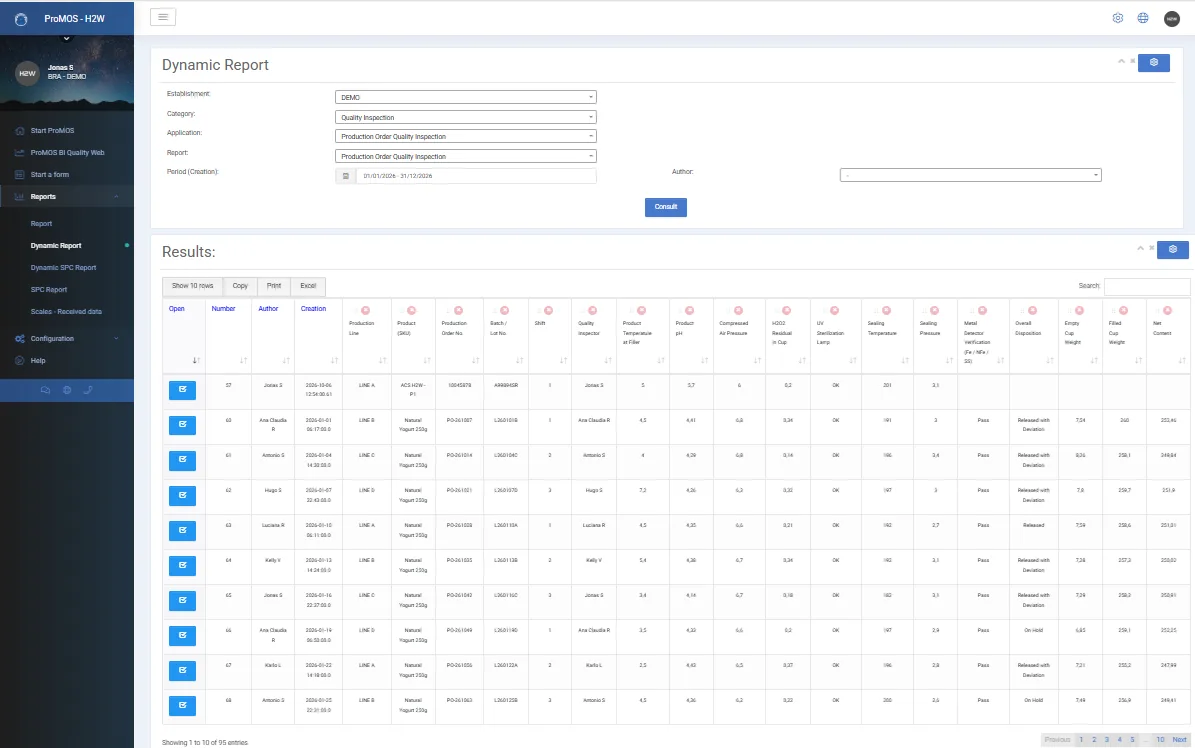
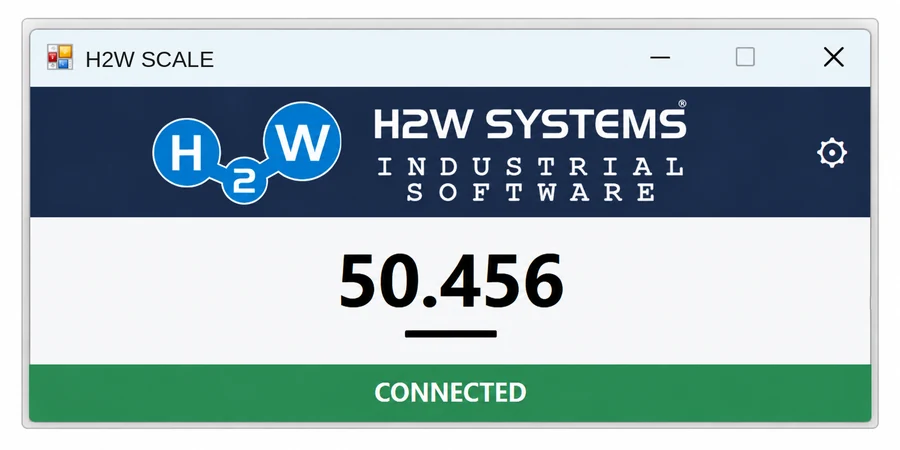
Weights recorded automatically, no typing
Data connection through H2W's own application — in three steps:
- 1Install the H2W app on the computer connected to the scale and set up the connection data.
- 2In QualityWeb, choose the form field that will receive the data from that scale.
- 3Done: from then on the weight loads into the form automatically, with the OK/NOK result instantly.
- No typing and no transcription errors
- Faster weighing and reliable samples for the SPC chart
- Report of the data received from each scale, for audits
What ProMOS™ Quality solves on the plant floor
Forms, product-specific limits, SPC, lot release and change history in one system.
Every check in a different place
Paper checklists, lab results in spreadsheets and separate Cpk calculations make it harder to review results together.
- Risk of lost records or changes without an audit trail
- Risk of identifying deviations only after shipment
- Releasing a lot means chasing paperwork
- SPC done afterwards, on copied data
- Searching files and folders for audit evidence
Checks recorded, verified and traceable
Records from each process stage checked against configured limits and stored with an audit trail.
- Quality controls: checklists, centerlines, lab analyses, lot release and internal audits
- Each step with its own form — and lot release can require every step to be OK
- Deviation alerts: out-of-limit values flagged during data entry, with the option to create linked action plans with assigned owners and due dates
- Full traceability: who filled in, changed and approved, with previous and new value, date and time
- Audit support: find records by lot, product, line or date range
- SPC analyses, Cp/Cpk indices and ProMOS BI metrics based on recorded data
- Integrated with ERP, scales, production and maintenance
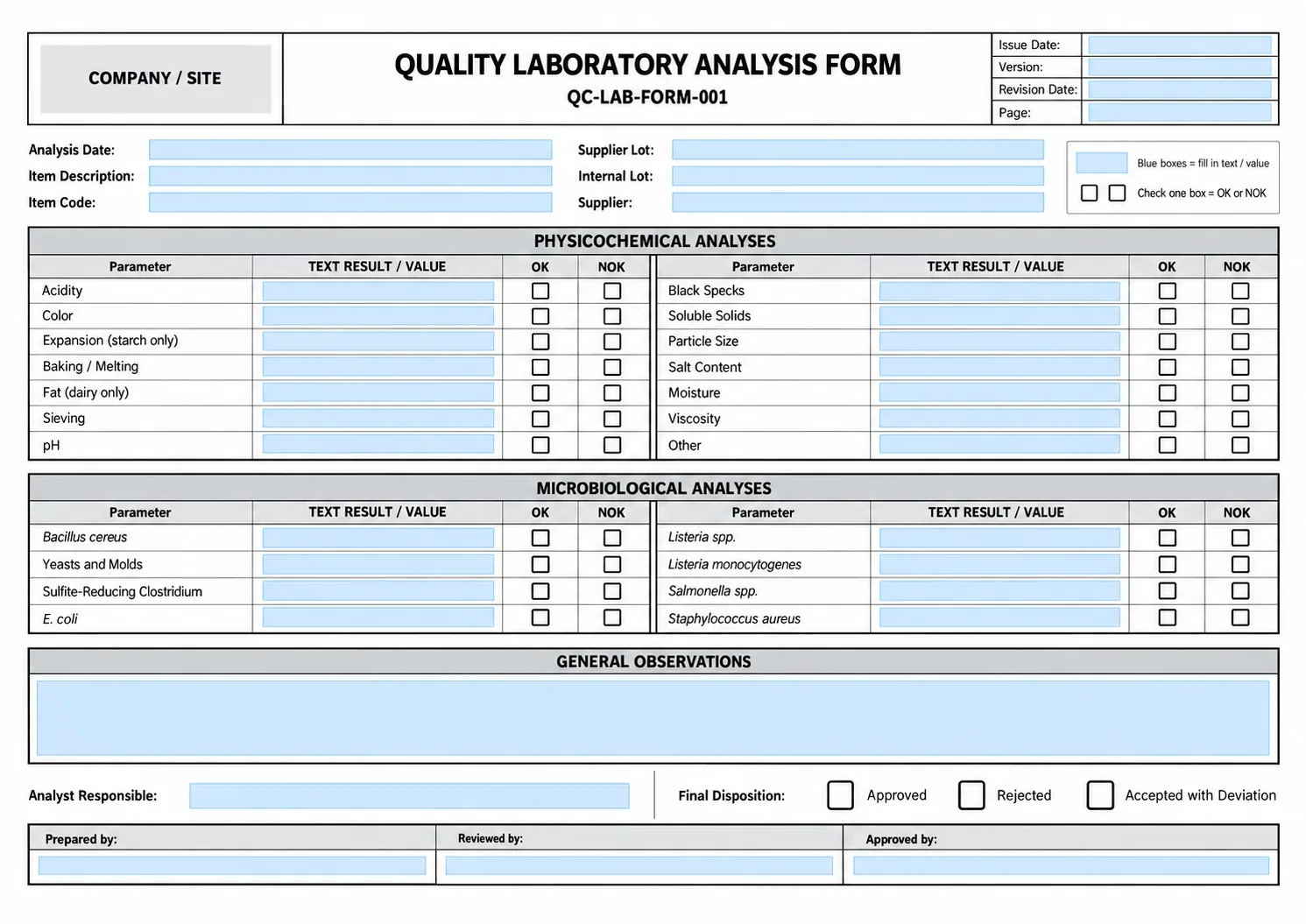
From paper to a digital form with AI
Your quality team gives the AI assistant a photo, PDF or spreadsheet of the current form; it builds the fields and the team fine-tunes them.
Ready to deploy. Built to adapt to your operation.
Proven industrial software, used in large-scale operations — that doesn’t force your plant to adapt to the system’s limits.
Ready and proven
ProMOS™ already runs in plants of global manufacturers. You start with a complete system, proven in day-to-day industrial operations.
Built around your operation
Rules, fields, calculations, reports and screens are adjusted to your process — you don’t change how you work to fit the system.
Not a closed product
If a detail didn’t come up in the initial analysis, it can be added later, without switching systems. Each customer has its own environment and database, which allows tailored adjustments.
Connected processes
Modules share information: a stop becomes a work order, a NOK becomes an action plan, an expired training shows up in production.
| Off-the-shelf software | Custom development | ProMOS™ | |
|---|---|---|---|
| Starting point | Ready-made product | A project to build | Ready-made product |
| Fit to your operation | Limited — the process follows the system | Full, with heavy specification effort | Configured to your operation |
| Evolution | Depends on the vendor’s roadmap | Depends on a new project | Continuous, as your needs change |
| Proven base | Yes | Built from scratch | Yes, in large manufacturers |
How the system supports these controls
Your quality team creates and updates forms in a web browser, without coding.
Forms built by AI
Describe the form or upload a photo, PDF or spreadsheet. The assistant creates the fields, and your team refines the form through additional instructions.
Limits per product NEW
Select a product to apply its configured limits. Results are evaluated and classified as data is entered.
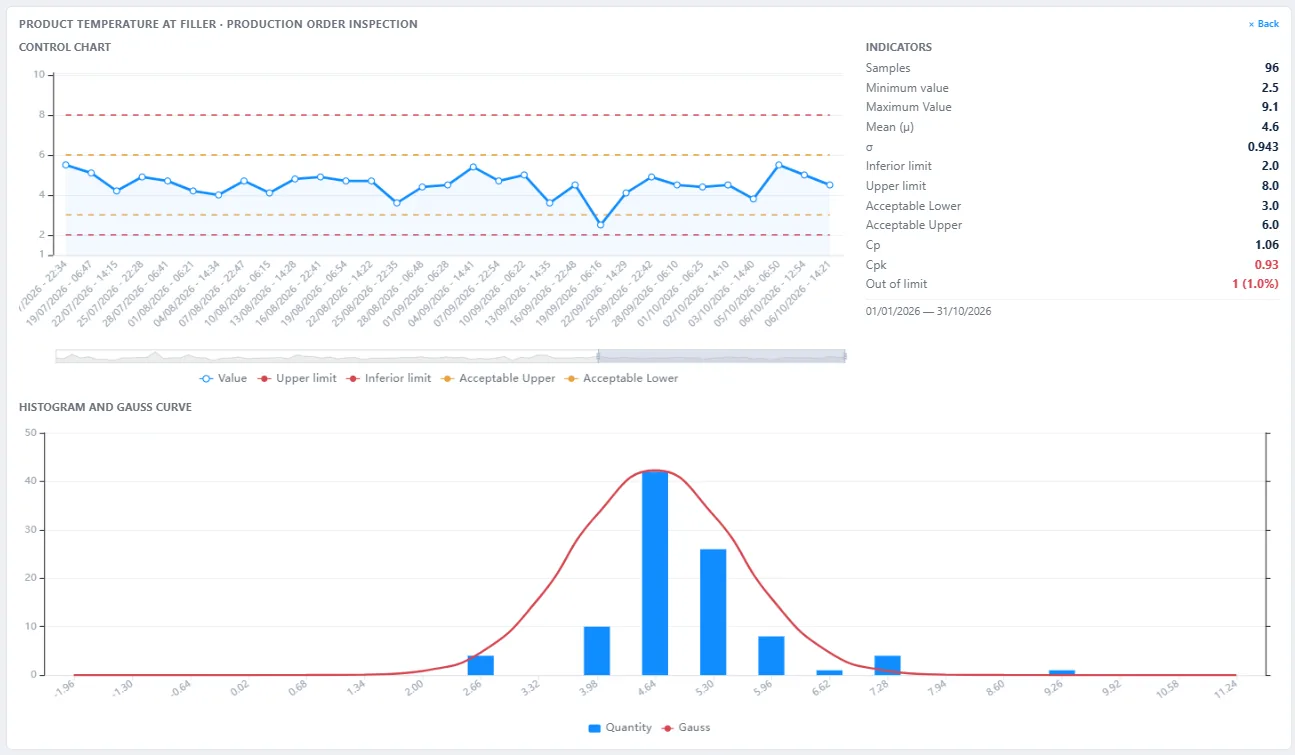
Statistical Process Control (SPC)
Control charts, histograms, normal distribution curves and process capability indices Cp and Cpk based on recorded data.
Weight straight from the scale
The H2W application, installed on the computer connected to the scale, transfers weight readings directly into the form field, without manual re-entry.
Full traceability
Who created, filled in, changed and approved — with previous and new value, date and time.
Action plans and integrations
Create action plans from NOK results and connect ProMOS™ Quality to production, maintenance and Microsoft Power BI, based on the integrations included in your project.
Bring it to us. We’ll come back with a better offer.
Send us any written proposal you received for a comparable quality system. We match the scope, fit it to the way your plant works and return a better offer — together with your demo.
Send my quote with the demo requestWritten proposal issued in the last 60 days, for a comparable scope (modules, users and integrations). We present a better proposal for the same scope; this is not an automatic price match. Your quote is covered by our confidentiality commitment.
- 1.Attach your quote to the demo request form on this page. PDF files are accepted.
- 2.We review the scope and prepare a demo using your form or an example from your industry.
- 3.Within 2 business days, you receive demo access and our proposal so you can compare scope and pricing.
20 years, product ready
Most of what you need already exists and runs at global manufacturers. Fewer project hours, faster go-live.
A lean, organized team
Our own platform links tickets, projects, costs and hours, supported by AI and defined workflows. Efficiency, not discounts.
Bootstrapped, no investors
Owner-run for 20 years, self-funded, no debt. No investor pressure on your pricing or on our roadmap.
Direct support
You talk to the team that knows your system — not a ticket queue where you wait and hope.
Proven at the top
The same platform trusted by the global manufacturers shown above, adapted to each operation.
How the demo works
Explore the system using an example from your industry or one of your company’s forms. A call with a specialist is optional.
Request a demo
Provide your contact details. Uploading one of your company’s forms is optional.
We prepare your demo
We prepare the demo using an example from your industry or the form you send. You can also upload the file directly to the demo environment and use the AI assistant.
Access + proposal
Within 2 business days, you receive demo access and a proposal based on the information you provided about your operation.
A call, if you want
Want to see SPC, reports and integrations in detail? We'll schedule a call with the people who implement it.
Request a ProMOS™ Quality demo
Request demo access and a proposal for your operation. A call with a specialist and uploading your own forms are optional.
FAQ
How much does it cost?
Pricing depends on the number of concurrent users and plants, integration requirements such as scales and ERP systems, and implementation scope. We use this information to prepare a proposal with pricing and an implementation timeline.
How does implementation work?
ProMOS™ Quality runs in a web browser. We work with your quality team on the initial setup, including forms, product-specific limits and user accounts, and support the rollout at your plant. Your team can then create and update forms independently.
Do I need to install anything?
ProMOS™ Quality runs in a web browser on computers, tablets and smartphones. Scale integration uses the H2W application installed on the computer connected to the scale.
Can you beat a quote I already have?
Usually, yes. Send us a written proposal for a comparable scope and we will come back with a better offer for the same scope, adapted to your operation. Our 20 years of ready-made product, a lean team and no investor pressure are what make it possible.
Do I have to join a meeting?
No. You get the demo access and the proposal by e-mail. A call is optional, for those who want more details.
Is my form kept confidential?
Yes. It is used only to build your demo and proposal, with access restricted to the responsible team, and it is deleted upon request or after 90 days without follow-up. You receive this commitment by e-mail when you submit the request.
I'd rather not send my form through the website. Is there another way?
Yes. Check “I'd rather upload my form directly in the demo environment”: we open the access and you upload the file yourself, with the AI assistant building the form. Files are handled according to the confidentiality commitment stated on this page.
Can I send more than one form?
Yes, up to 5 files per request. If you have more, send the main ones and we'll handle the rest later.