ProMOS™ · CMMS
CMMS Software — Industrial Maintenance Management
The ProMOS™ CMMS module organizes preventive and predictive plans, routes and work orders at the plants of world leaders — with costs, equipment history and real-time MTBF and MTTR.
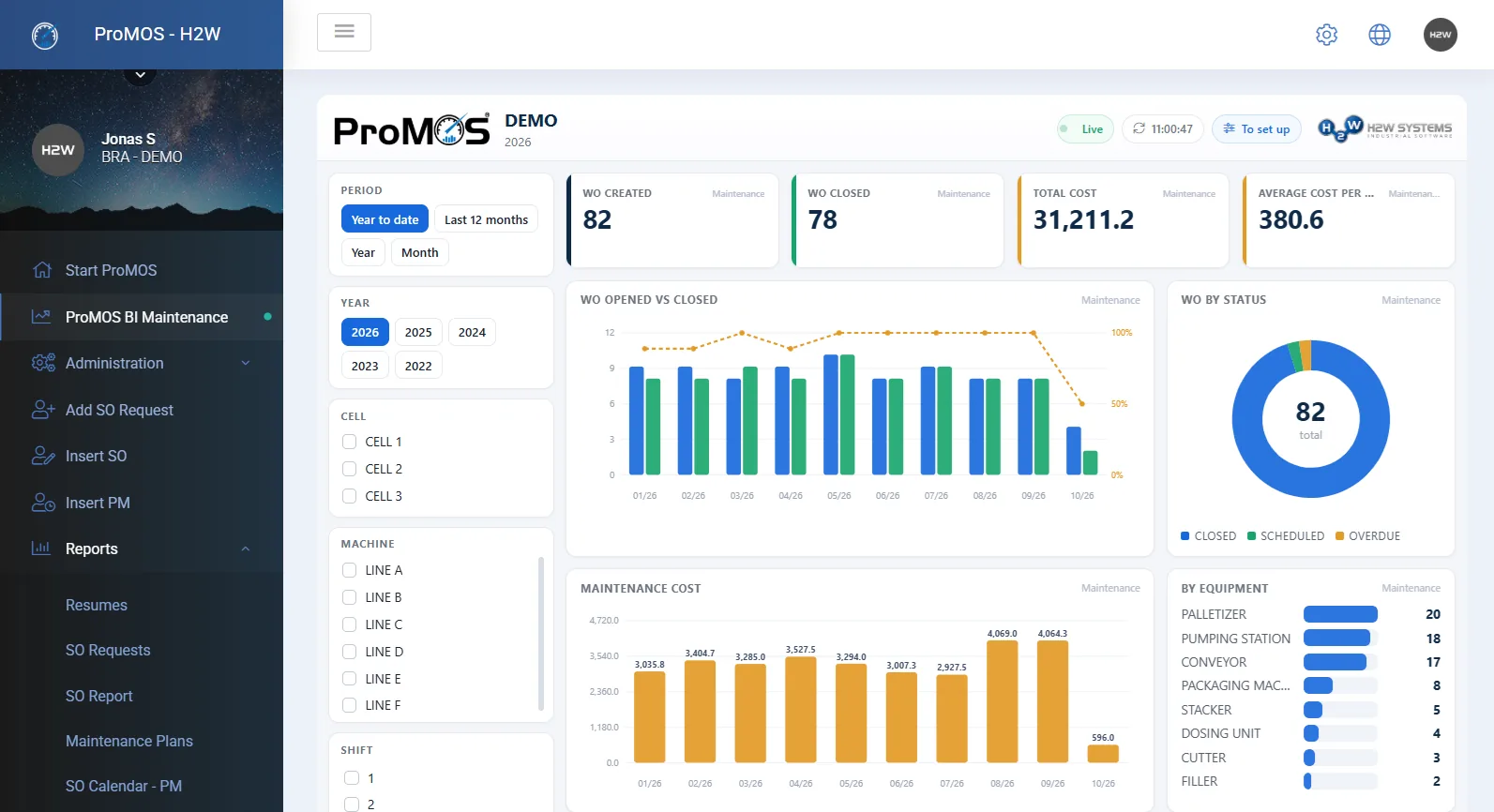
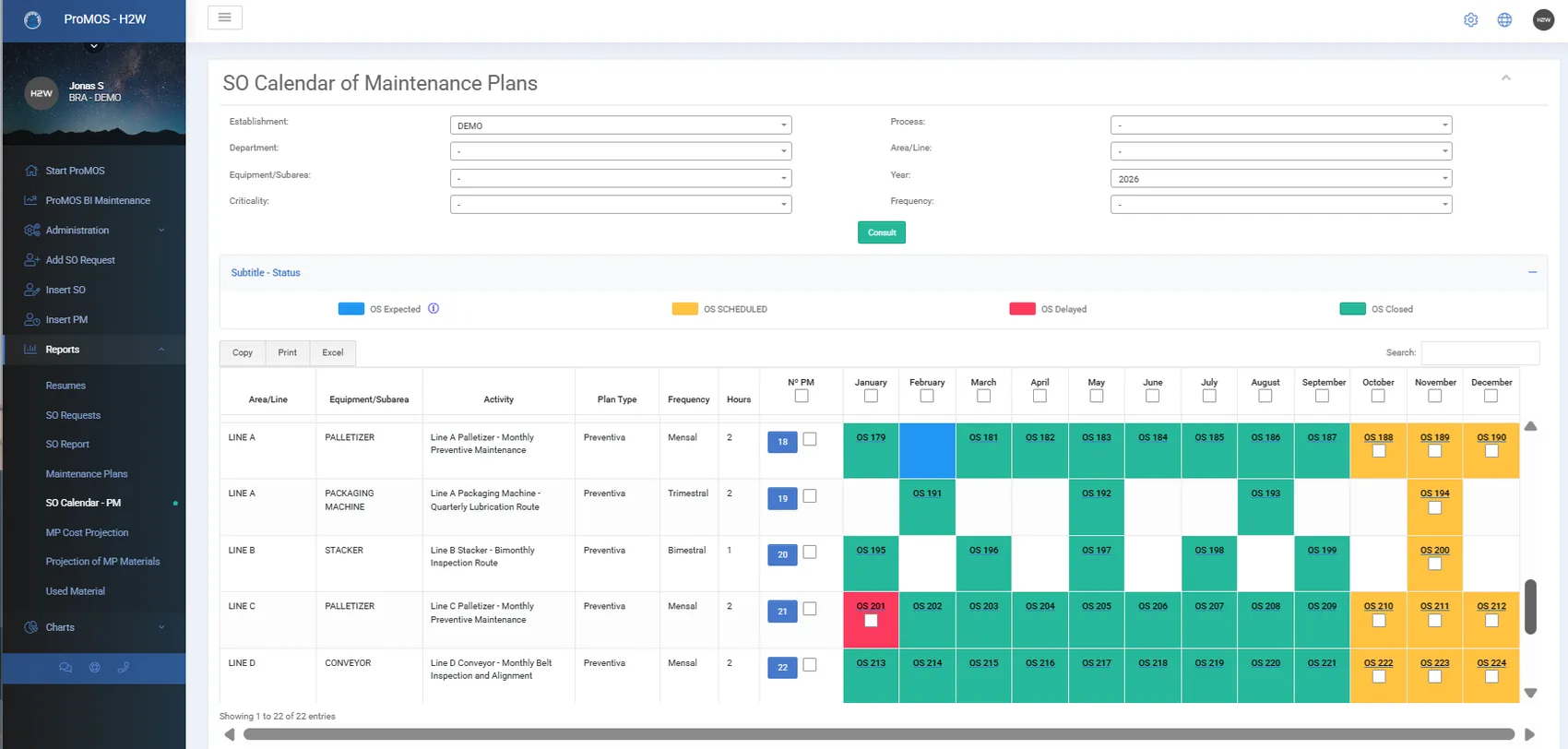
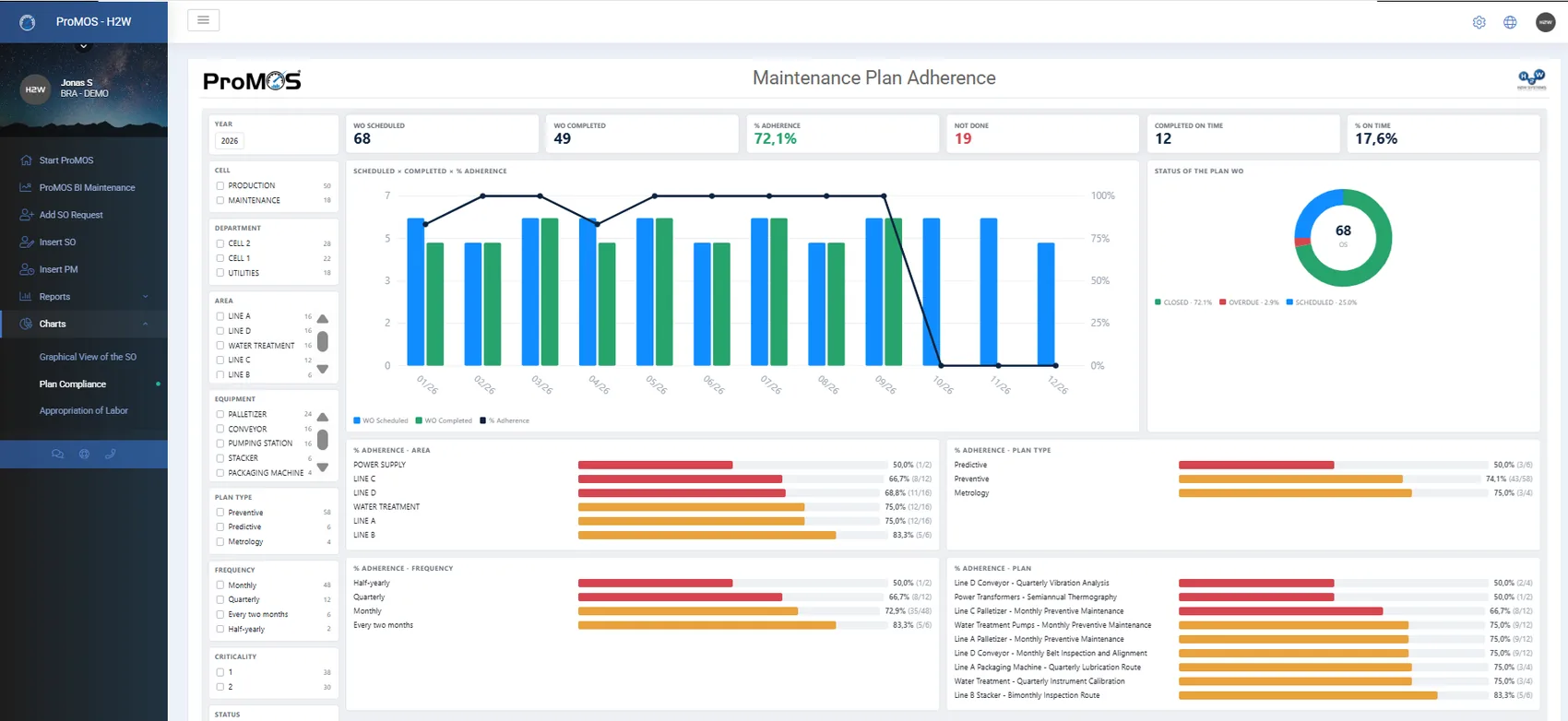
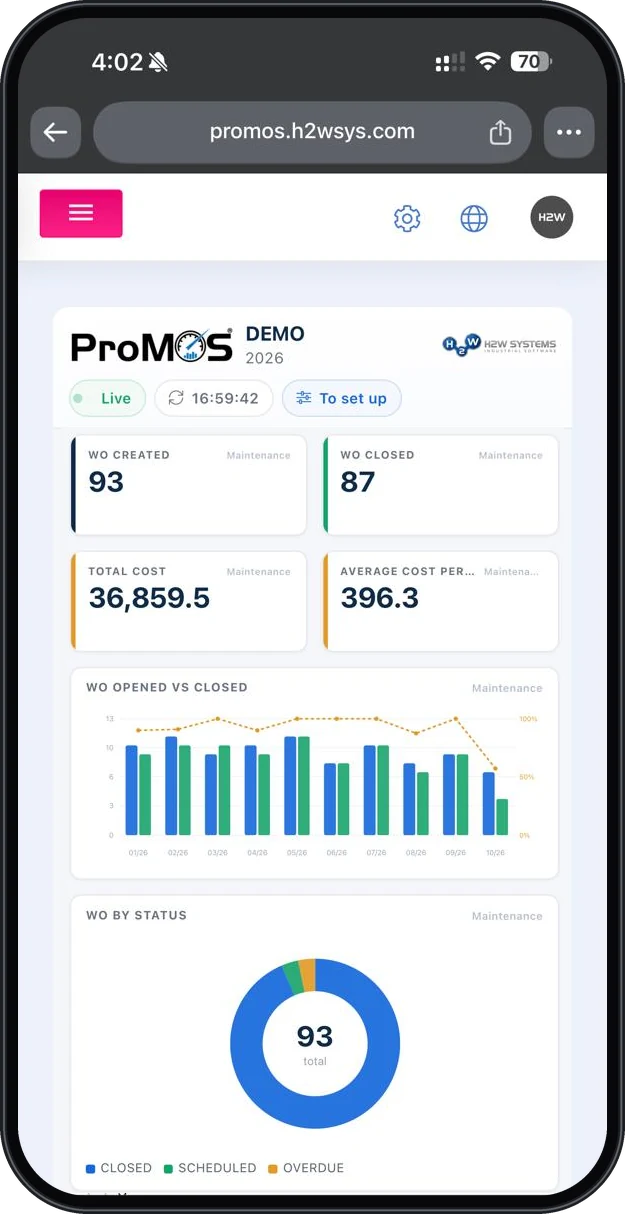
Inside the module
See the module from the inside
From management views to operator entries — browse the main screens.
Results
What changes in the maintenance routine
Less corrective work, more predictability — what plants feel in the first weeks:
Integrations
Connected to what your plant already uses
CMMS exchanges data with your ERP, the warehouse and MES — from the equipment master to the cost of each order.
Equipment, cost centers and materials already registered feed the CMMS — no retyping.
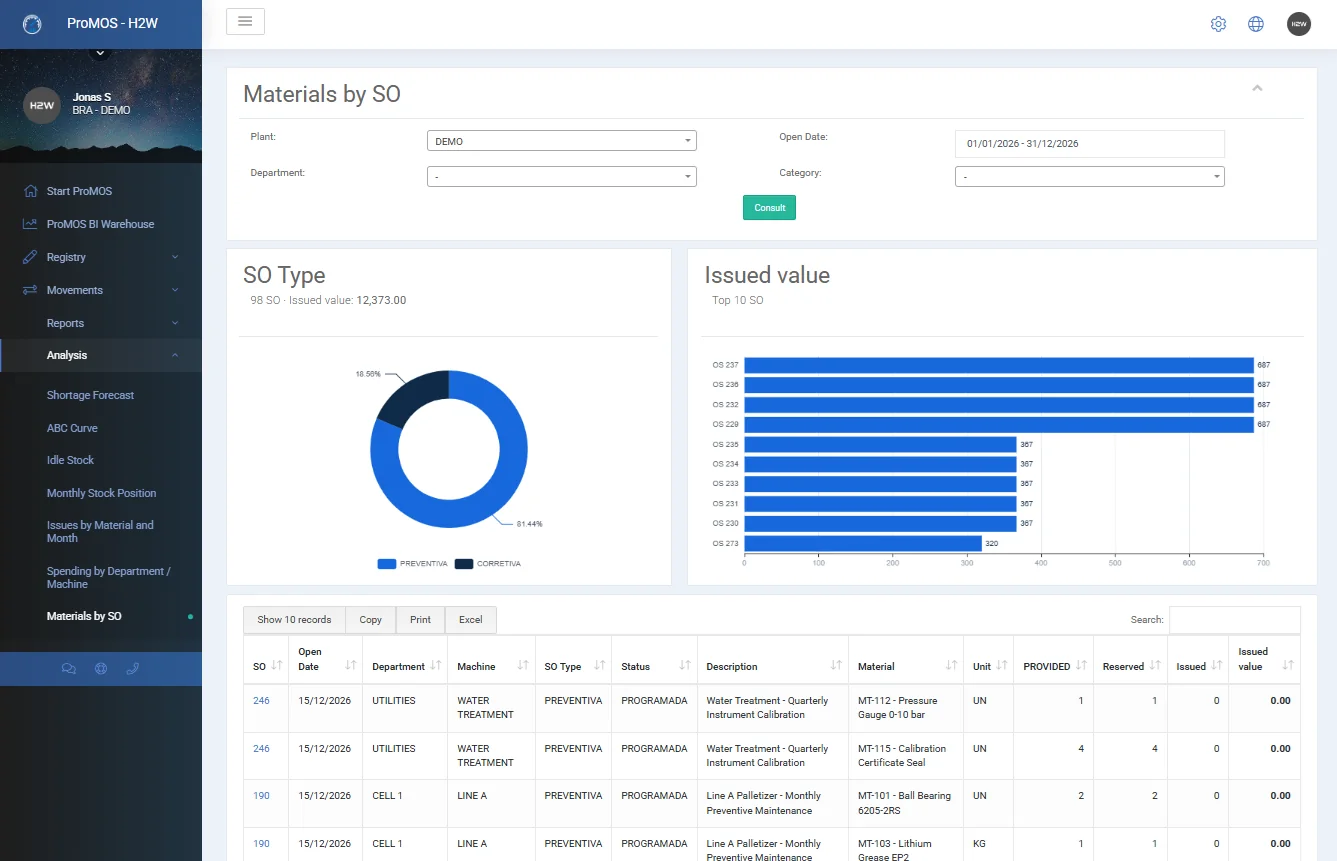
Single register: work-order parts reserved automatically and issued from stock when the order closes.
Data arrives in many different ways — ProMOS™ adapts to your software's interface and your company's rules.
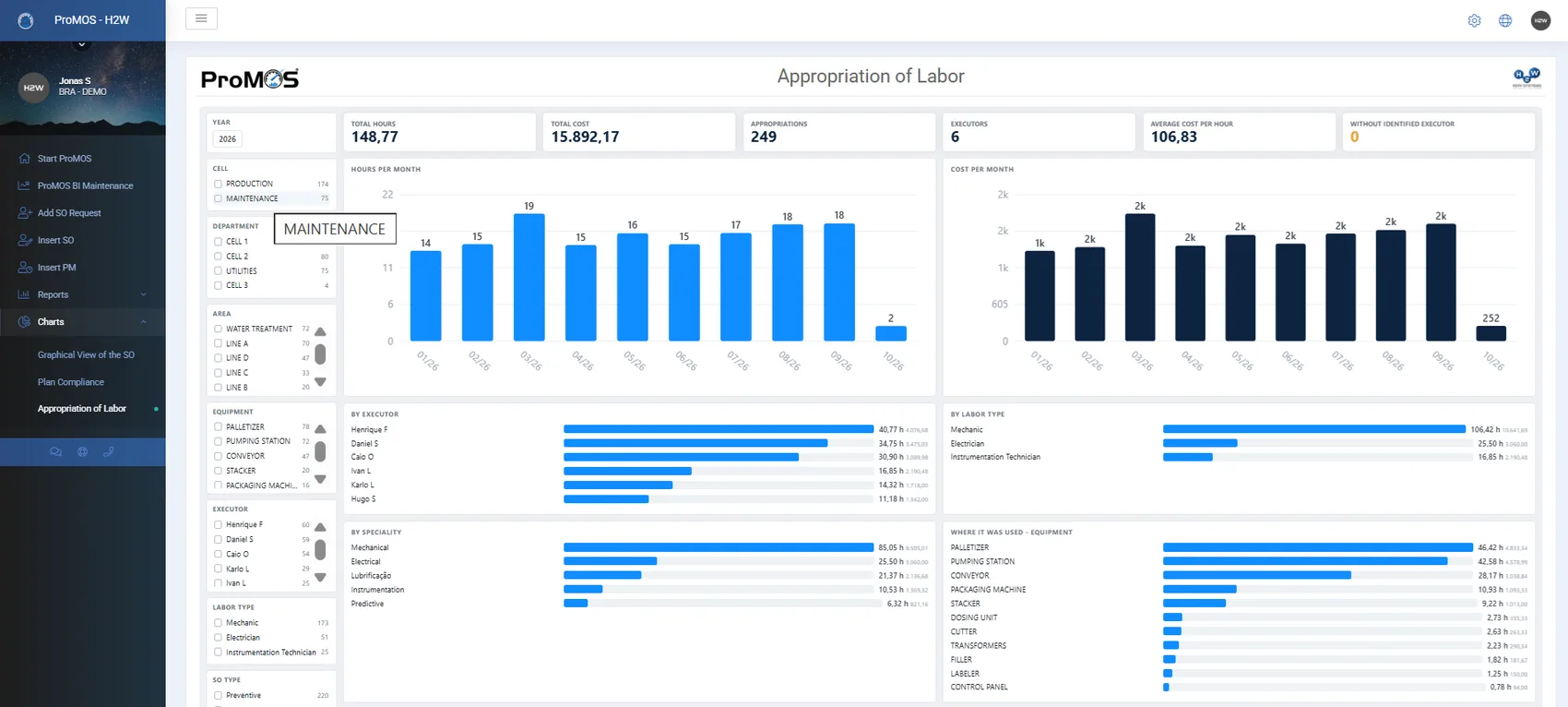
Requests, approvals, execution and hour logging with cost per executor.
Real-time MTBF, MTTR, backlog and costs; Excel export and integration with other systems.
The golden rule: wherever ProMOS™ receives or sends data, your company's rules are enforced — information is validated in real time and only the data that truly matters to the business is used.
Integrated platform
CMMS doesn't work alone
Each module works on its own and is optional — but together the gains multiply: a production stop becomes a work order, an analysis and a preventive routine. Watch the connections light up on the map.
 CMMS
CMMS
Why ProMOS™ is different
A platform that evolves with your operation
ProMOS™ adapts to the way your plant works, keeps pace with changes in the operation and connects different processes to turn information into continuous improvement.
Flexibility
Systems follow the H2W standard, but can be fully customized for your operation. ProMOS™ is not a platform of closed, off-the-shelf products.
Continuous Evolution
ProMOS™ keeps pace with the changes that arise in the operation, business rules, legislation, management and audits — and evolves with them.
Interconnected Processes
ProMOS™ links the operation's processes together, making data entry easier and generating complete information.
Continuous Improvement
The indicator is just the start of the analysis. ProMOS™ connects the information to understand what influences the result:
From operation to results.
Features
What the module delivers
The main features, for those who want to check item by item — and there's always more than fits here:
Main module features
Guided deployment
The module goes live configured to your plant’s equipment structure and maintenance organization.
- Initial setup of specialties, executor types and hourly costs, materials and equipment structure, together with the maintenance team.
- Team support at the start of use.
Equipment master and technical record
The whole maintenance technical structure in one place — each asset with its record, documents and history.
- Specialties (mechanical, electrical, instrumentation etc.) and executor types with hourly cost; executors taken from the ProMOS™ employee master.
- NEWMaterials and spare parts with unit and cost, used in orders and plans. With the WARE module, there is a single register and work-order materials are reserved and issued from stock automatically.
- Hierarchical asset structure: area, line, equipment and parts/components.
- Technical record with TAG, manufacturer, model, year, asset number, A/B/C class, dimensions, weight, voltage, value and components.
- Technical attachments: manuals, drawings, photos and instructions.
- Consolidated history of each asset’s orders and plans.
Service requests
Any area formalizes its needs in ProMOS™ and follows up on the service.
- Request with number, date, area, line, equipment and description.
- Review by maintenance: the request stays pending until approved or rejected.
- Mandatory justification on rejection, with owner and date.
- Work order generated from the approved request, reusing description and comments, with the link recorded.
- Status visible to requesters; reports by status, area and period, with Excel export.
Work orders and maintenance costs
Every intervention controlled from planning to validation — with activities, executors, times and total cost.
- Work order with number, type, criticality, area, line, equipment and component; scheduled, execution and closing dates.
- Sequential activities by specialty, with comments during execution.
- Executors per activity with start and end times; planned labor on orders generated from plans.
- Automatic total cost: labor (hours × hourly cost), materials and parts, and extra costs such as contractors and rentals.
- Costs visible only to the module administrator.
- Attachments and evidence: photos, reports and contractor documents.
- Activities closed by executors and order validated by the administrator; justified rejection and reopening, all traced.
Warehouse integration (WARE)
With the Maintenance and Warehouse modules, maintenance parts move through stock automatically.
- Single register of materials and parts for the warehouse, work orders and plans.
- Automatic reservation of the materials on work orders, including those generated by plans, with the scheduled date as expected issue date.
- Automatic issue when the work order is closed, with cost; closing is blocked if physical stock is insufficient.
- Reversal on reopening and cancellation of reservations when the order is deleted.
- Material shortage forecast from scheduled work orders, with expected date and purchase cost.
Preventive plans and calendar
Plans define activities, resources and costs in advance — and orders are generated from them automatically.
- Plan per equipment with type and subtype (preventive, predictive, metrology, inspection and lubrication routes), frequency from monthly to four-yearly, criticality and planner.
- Planned activities, labor per executor type and materials with quantities and costs.
- Calculated forecast of labor, materials and total plan cost.
- Manuals and procedures attached to the plan, accessible from the order.
- Automatic rescheduling of the next order at closing; plan duplication for similar equipment.
- Calendar with scheduling and rescheduling, including in batch; status of each order: planned, scheduled, overdue or closed.
ProMOS BI — Maintenance
Native analysis in the format of modern BI tools, with no additional Microsoft Power BI license.
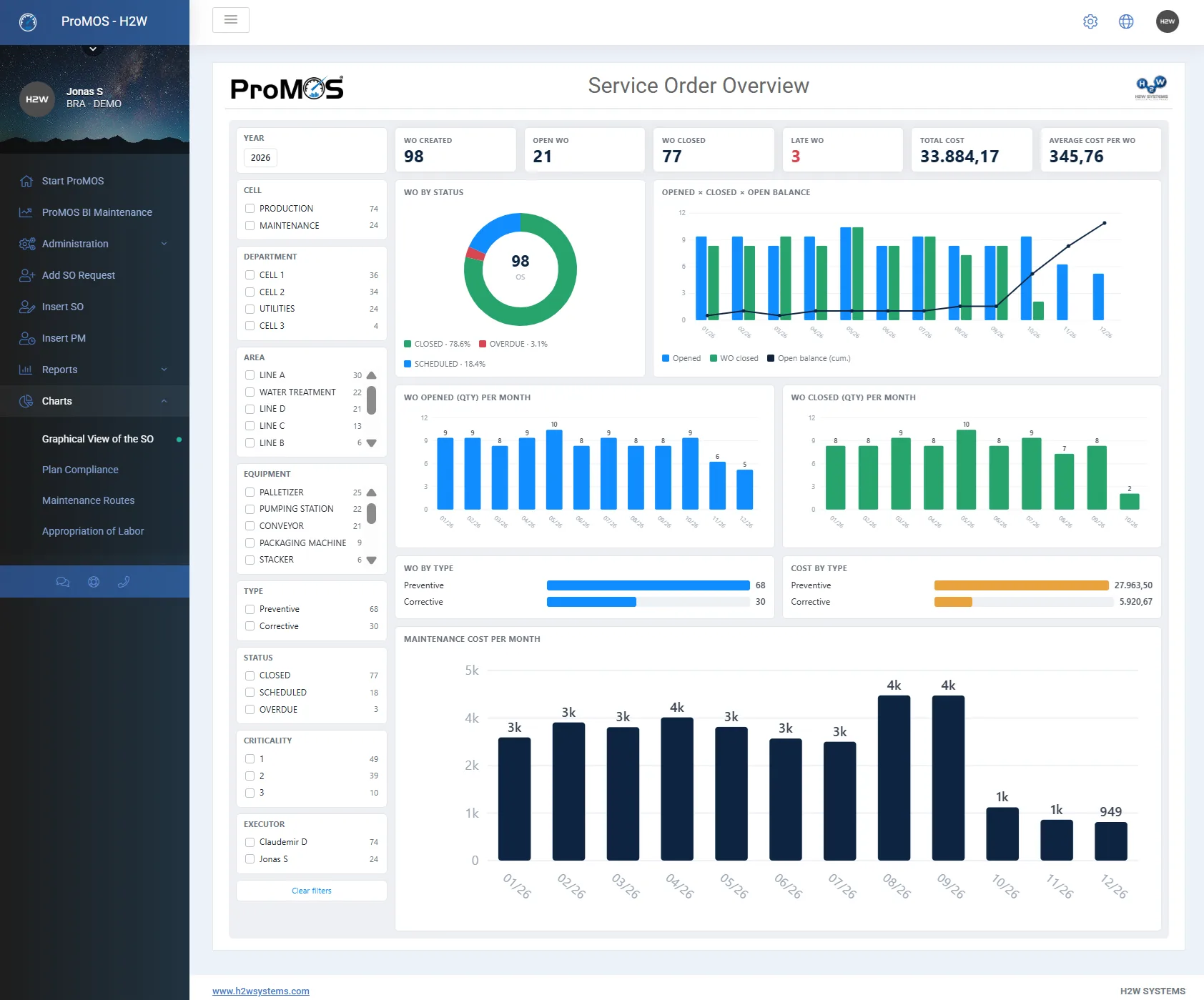
- Orders created, open, overdue and completed; monthly open vs. completed.
- Analyses by status, criticality, type and equipment.
- Plan compliance: percentage and planned vs. done across the year.
- Routes: orders done vs. not done per equipment.
- Costs: total, average cost per order and monthly evolution, broken down by labor, materials and other expenses.
- Data integration with Microsoft Power BI and other systems (Power BI add-on).
Maintenance reports
To follow execution, analyze asset history and plan resources and budget.
- Equipment with access to technical records; reports on requests, orders and plans with their executions.
- Planned costs per intervention in each plan (labor, materials and other costs), for budget planning.
- Materials and parts planned in the plans, supporting purchasing and stock; materials used by item and equipment.
- Excel export.
Access profiles
Individual access per user, with functions separated by profile.
- Administrator: full administration — request approval, order validation, rejection and reopening, plans, calendar, records and costs.
- User: opens requests, records activity execution (executors, times, comments, materials and attachments) and views reports and dashboards.
Ready to deploy. Built to adapt to your operation.
Proven industrial software, used in large-scale operations — that doesn’t force your plant to adapt to the system’s limits.
Ready and proven
ProMOS™ already runs in plants of global manufacturers. You start with a complete system, proven in day-to-day industrial operations.
Built around your operation
Rules, fields, calculations, reports and screens are adjusted to your process — you don’t change how you work to fit the system.
Not a closed product
If a detail didn’t come up in the initial analysis, it can be added later, without switching systems. Each customer has its own environment and database, which allows tailored adjustments.
Connected processes
Modules share information: a stop becomes a work order, a NOK becomes an action plan, an expired training shows up in production.
| Off-the-shelf software | Custom development | ProMOS™ | |
|---|---|---|---|
| Starting point | Ready-made product | A project to build | Ready-made product |
| Fit to your operation | Limited — the process follows the system | Full, with heavy specification effort | Configured to your operation |
| Evolution | Depends on the vendor’s roadmap | Depends on a new project | Continuous, as your needs change |
| Proven base | Yes | Built from scratch | Yes, in large manufacturers |
Testimonials
What our clients say
"H2W SYSTEMS™ has an excellent set of web-based solutions for Industrial Management. The cost-benefit ratio and ease of customization are great differentials.
I have known H2W™ for a decade, since they began customizing and simplifying the information management systems for giant P&G. Since then, many other large companies have joined their portfolio, and they continue to be a reference in the industry."
"H2W's™ custom-built systems have been driving unprecedented productivity growth across the departments in my company, and the cost-benefit is spectacular.
In fact, it is possible to use 100% of what is contracted, versus the closed systems sold in the market where only a small part is ever used."
"A responsible, young, dynamic international company with deep knowledge of its clients and, above all, with cutting-edge technologies and tailor-made developments that meet the required needs."
★★★★★
"A tool that handles complex operations in a practical, easy-to-understand way. Extremely functional — it has direct integration with applications like SAP."
★★★★
"I use this tool every day. Factory efficiency, number of tags opened and resolved — factors that contribute to our commitment to excellence in the market."
★★★★
"I use the software for training management — it helps me a lot in my daily work. It's practical, intuitive, and has excellent technical support."
★★★★
"A very reliable platform. Data is stored safely and nothing gets lost in the system. Easy to use, with comprehensive and simple reporting visibility."
★★★★★
"Practical to verify the required trainings for each employee and their status. I don't miss any feature in the software."
★★★★★
"Every time I needed help — regardless of the hour — they were ready to provide user support. The weighing label system is simple and fast."
Specialized Consulting
Beyond the software: consulting on production indicators
We help structure OEE, PR, reliability or any indicator your operation requires — with a methodology born from 20 years of practice in the world's best factories.
- Diagnosis of your current indicators and the data sources behind them
- Standardized calculation: OEE, PR, MTBF/MTTR and indicators specific to your process
- Team training and a management routine to sustain the gains over time
ProMOS™
Explore the other modules
Ready to take maintenance off spreadsheets?
Talk to our team and see how ProMOS™ CMMS organizes your plant's preventive plans, orders and costs.